This small project showcases AWS Kinesis Data Streams: what they are, how does one think about the abstractions, the code (Java) and an example on how to achieve distributed log processing using kinesis data streams, using dynamodb as storage structure after processing.

Project index:
Index:
- [data streams]
- aws kinesis data streams
- the data record
- aws kinesis data records defaults
- producers: putting data records on a stream
- the shard
- multiple shards
- types of shard iterators
- KCL: A library for Kinesis data streams consumer applications
- some KCL concepts
- worker
- processor
- DynamoDB lease table and checkpoints
- a basic example of initialization of a KCL consumer application
- Scheduler
- features of KCL
- initiating a KCL application
- obtaining and processing data records with KCL
- taking a closer look at the ShardRecordProcessor methods
- processing with java and sending to aws dynamodb and aws event bridge
- improving the LogShardRecordProcessor
- improving the LogShardRecordProcessor further: adding asynchronous writes to DynamoDB
- writing to DynamoDB
- putting events in Event Bridge
- some KCL concepts
- terraform
- AWS IAM
data streams
Before talking about an AWS Kinesis data stream, one should start with the data stream itself: a continuous, ordered flow of data pieces that represent some stateful data feed.
Consumer logic typically processes all available data, often replaying from history, reprocessing certain windows, and treating streams like unbounded (continuous, never-ending data streams with no beginning or end) datasets.
The data stream serves it's main purpose when thinking on decoupling; producers need not know about consumers, and vice versa. Also, scaling a stream does not mean scaling a producer or consumer.
Examples of systems that benefit from these architectures are server/application logs, IoT sensors, real-time platforms, etc. Anything that can stream data and is complex enough that justifies the challenges that a data stream entails.
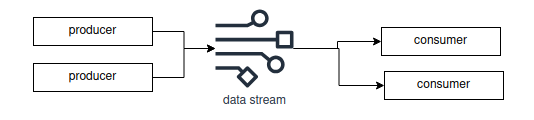
aws kinesis data streams
An AWS Kinesis data stream is an AWS managed resource for data stream.
the data record
From the docs, a data record is the unit of data stored in a data stream.
Data records are composed of a sequence number, a partition key and a data blob of up to 1MB.
producers: putting data records on a stream
A producer is an application that sends data records to a data stream. The specific operation is called PutRecords.
        PutRecordRequest request = new PutRecordRequest()
                .withStreamName(streamName)
                .withPartitionKey(logEvent.getApplication())
                .withData(ByteBuffer.wrap(json.getBytes()));

        kinesisClient.putRecord(request);
The partition key determines which shard the data record will go to.
the shard
An AWS Kinesis data stream is composed of shards. A shard is chosen as a container for specific data records when a data record is sent to a stream. When there's more than one shard available, the particular shard that will hold a data record is determined by the partition key of the record.
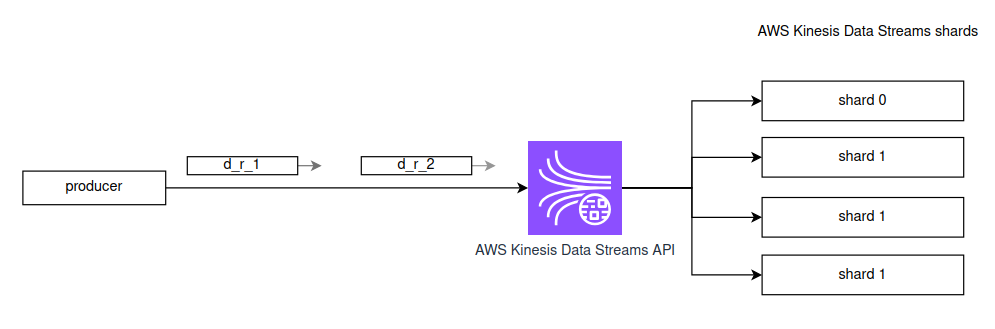
multiple shards
Here lies one of the challenges of working with AWS Kinesis Data Streams: shard management is not done automatically, at least not on the provisioned mode (there's an on-demand mode that abstracts all of this).
On this provisioned mode, one must choose the desired ingest and extraction capacity to and out of the data stream. Each shard provides up to X MB/s in as ingest capacity, and up to Y MB/s as throughput for consumers. Also, each shard has up to Z transactions/s capacity for write transactions, and up to W transactions/s capacity for read transactions.
Inserting into the stream when there's multiple shards is easy; the code snippet above shows that just by specifying the partition key, a shard will hold our data record just fine.
But consuming from the stream is different. We can list the shards, obtain an iterator for the shard, and iterate through it to start processing data. If we don't iterate through a shard, we'll NOT read its data. Each shard holds data independently; multiple shards don't share data.
types of shard iterators
One can read from a data stream in a couple of ways, each corresponding to a shard iterator one can create and use.
From the docs:
- AT or AFTER SEQUENCE_NUMBER - Start reading from the position denoted by a specific sequence number.
- AT_TIMESTAMP - Start reading from the position denoted by a specific time stamp.
- TRIM_HORIZON - Start reading at the oldest data record in the shard.
- LATEST - Start reading just after the most recent record in the shard.
I'll be using LATEST, since this project focuses on read incoming log messages that are arriving to the stream.
Management of shards and consumers is a complicated job that has already been solved for us. KCL is a Java library that aids in this task.
KCL: A library for Kinesis data streams consumer applications
From the docs:
[KCL is a] standalone Java software library designed to simplify the process of consuming and processing data from Amazon Kinesis Data Streams. ... It manages activities such as load balancing across multiple workers, responding to worker failures, checkpointing processed records, and responding to changes in the number of shards in the stream..
This means we don't have to manage shards ourselves, we can initiate a consumer application that reads from a kinesis data stream, and shard management is done on our behalf, with the help of a DynamoDB table.
Some KCL concepts
worker
A running JVM instance of a KCL application, that reads data from a Kinesis data streams shard.
Each worker has processors that read from shards, and this is managed for us via a DynamoDB lease table.
processor
The shard-specific unit of business logic tied one-to-one to a shard, that reads from it with the help of the Scheduler. Belongs to a worker.
DynamoDB lease table and checkpoints
Table stored in a key-value, NoSQL database that associates each worker to a shard and a checkpoint (last successful read). Only the current owner of a lease can checkpoint into it's shard in the lease table. On restart/failover, the new worker resumes after that point.
A basic example of initialization of a KCL consumer application
Let's say we decide to have 8 shards, because that'll match our application requirements. And that for this, we assign 2 workers.
Each worker is a KCL application that runs a KCL Scheduler (see below).
The lease balancing process assigns approximately 4 shards per worker (difference ≤1).
Each worker creates one processor per shard it leases --> ~4 processors per worker, each bound to a distinct shard.
Scheduler
The core orchestration engine of the KCL library.
Owns the kinesis and dynamodb clients, and is the object that:
- coordinates workers by talking to dynamo db to acquire/release shard leases
- spins up processors when it gets a lease (calls ShardRecordProcessorFactory, see below)
- pulls data to fetch records in behalf of the processors (calls
processor.processRecords(...)) - handles checkpoints (processors tell the scheduler to checkpoint)
- runs lifecycle hooks (
initialize,processRecords,leaseLost, etc) - reports metrics to cloudwatch
Features of KCL
- scalability: we can define multiple application instances that read from shards. KCL organizes these into workers.
- load balancing: read load is balanced across workers (KCL uses shard stealing to converge on an even lease count per worker).
- checkpointing: KCL manages checkpointing of processed records, enabling applications to resume processing from their last successfully processed position. We can control when checkpoints occur.
- fault tolerance: if a worker fails, there are mechanisms in place to ensure that the shard it had leased is now leased by another worker that can continue reading from it.
Every worker's Scheduler "heartbeats" in the form of a field in the DynamoDB lease table that it's functioning. If the worker stops heartbeating, then the other workers will treat the leased shard as expired, and will decide who obtains the new lease to start reading from it.
- handling stream-level changes: KCL adapts to shard splits and merges... It maintains ordering by making sure that child shards are processed only after their parent shard is completed and checkpointed.
- delivery semantics: at-least-once delivery to the worker processor is guaranteed.
Initiating a KCL application
The following code sets up a worker in a KCL Java 17 application:
        AppConfig cfg = AppConfig.fromEnv();
        DefaultCredentialsProvider creds = DefaultCredentialsProvider.create();
        Region region = Region.of(cfg.awsRegion());
        String workerId = UUID.randomUUID().toString();

        KinesisAsyncClient kinesis = KinesisAsyncClient.builder().region(region).credentialsProvider(creds).build();
        DynamoDbAsyncClient dynamo = DynamoDbAsyncClient.builder().region(region).credentialsProvider(creds).build();
        CloudWatchAsyncClient cloudwatch = CloudWatchAsyncClient.builder().region(region).credentialsProvider(creds).build();

        LogRecordProcessorFactory factory = new LogRecordProcessorFactory(cfg);
        InitialPositionInStream initialPosition = InitialPositionInStream.LATEST;
        InitialPositionInStreamExtended initialPositionExtended =
                InitialPositionInStreamExtended.newInitialPosition(initialPosition);
        SingleStreamTracker streamTracker = new SingleStreamTracker(
                StreamIdentifier.singleStreamInstance(cfg.streamName()),
                initialPositionExtended
        );

        ConfigsBuilder configs = new ConfigsBuilder(
                streamTracker,
                cfg.applicationName(),
                kinesis,
                dynamo,
                cloudwatch,
                workerId,
                factory
        );

        RetrievalConfig retrieval = configs.retrievalConfig()
                .retrievalSpecificConfig(new PollingConfig(cfg.streamName(), kinesis));

        Scheduler scheduler = new Scheduler(
                configs.checkpointConfig(),
                configs.coordinatorConfig(),
                configs.leaseManagementConfig(),
                configs.lifecycleConfig(),
                configs.metricsConfig(),
                configs.processorConfig(),
                retrieval
        );

        Runtime.getRuntime().addShutdownHook(new Thread(scheduler::shutdown));
        scheduler.run();
There are a couple of classes of interest:
- KinesisAsyncClient: the object we use to interact with the Kinesis API in a non-blocking (most of the time) way.
- DynamoDbAsyncClient: same thing for DynamoDB.
- LogRecordProcessorFactory: a project class (Logs are what we'll process) that implements a Kinesis class called ShardRecordProcessorFactory.
ShardRecordProcessorFactory: whenever the KCL scheduler (see below) starts processing a shard, it asks the factory to create a new ShardRecordProcessor. That processor is the class where our business logic lives: the
initialize,processRecords,leaseLost,shardEndedandshutdownRequestedmethods. - Since we're using LATEST as the shard iterator in this project, the StreamTracker isn't of much interest to us. Just know this:
- InitialPositionInStream (enum) sets the policy for where to start the very first time, when a shard has no checkpoint yet.
- InitialPositionInStreamExtended is the same thing, but it's a wrapper of the previous class that also holds, besides the enum, a timestamp for the AT_TIMESTAMP value of the InitialPositionInStream enum. This class is just a way of holding one more piece of information that is needed if the InitialPositionInStream equals AT_TIMESTAMP.
- SingleStreamTracker: tells KCL which stream we're using and where to start reading from if there's no checkpoint.
- Scheduler: as described above, owns the kinesis and dynamodb clients, and is responsible from reading and checkpointing the shards, lease management and coordination.
Obtaining data records with KCL
There is not much more needed than the basic setup of the previous section. The app should be already initializable, so that the workers obtain leases and the processors are created.
Before looking at LogShardRecordProcessor, let's look at ShardRecordProcessor (a KCL interface) to see what we'll implement.
taking a closer look at the ShardRecordProcessor methods
Looking at the ShardRecordProcessor interface:
public interface ShardRecordProcessor {
    void initialize(InitializationInput initializationInput);
    void processRecords(ProcessRecordsInput processRecordsInput);
    void leaseLost(LeaseLostInput leaseLostInput);
    void shardEnded(ShardEndedInput shardEndedInput);
    void shutdownRequested(ShutdownRequestedInput shutdownRequestedInput);
}
It's what we implement with our LogShardRecordProcessor (see below).
A description line for each of the methods:
- initialize: Invoked once, at the start, by [KCL] before data records are delivered to the ShardRecordProcessor instance.
- processRecords: [KCL] will invoke this method to deliver data records to the application.
- leaseLost: Called when the lease that tied to this record processor has been lost. Once the lease has been lost the record processor can no longer checkpoint.
- shardEnded: Called when the shard that this record process is handling has been completed. Once a shard has been completed no further records will ever arrive on that shard. When this is called the record processor must call RecordProcessorCheckpointer. checkpoint(), otherwise an exception will be thrown and the all child shards of this shard will not make progress.
- shutdownRequested: Called when the Scheduler has been requested to shutdown. This is called while the record processor still holds the lease so checkpointing is possible. Once this method has completed the lease for the record processor is released, and leaseLost(LeaseLostInput) will be called at a later time.
processing with java and sending to aws dynamodb and aws event bridge
We expect the shards to deliver LogEvent objects like this:
@JsonIgnoreProperties(ignoreUnknown = true)
public class LogEvent {
    public Instant timestamp;
    public String level;
    public String service;
    public String message;
    public Map<String, Object> context;
}
And then the LogShardRecordProcessor looks like this (pseudojava, exception handling omitted):
public class LogShardRecordProcessor implements ShardRecordProcessor {
    private final ObjectMapper mapper = ...;
    private final DynamoWriter dynamoWriter;
    private final EventBridgePublisher eventPublisher;

    public LogShardRecordProcessor(AppConfig config) {
        ...
    }

    @Override public void initialize(InitializationInput input) {}

    @Override public void processRecords(ProcessRecordsInput input) {
        List<LogEvent> batch = new ArrayList<>();
        for (KinesisClientRecord r : input.records()) {
            String raw = StandardCharsets.UTF_8.decode(r.data()).toString();
            try {
                LogEvent e = mapper.readValue(raw, LogEvent.class);
                batch.add(e);
                if (e.level != null && e.level.equalsIgnoreCase("ERROR")) {
                    eventPublisher.publish(e);
                }
            } catch (Exception ignored) {
                // OPTIONALLY send to dead-letter queue
            }
        }

        // Side effects with retries (at-least-once)
        runWithBackoff(() -> if (!batch.isEmpty()) dynamoWriter.putBatch(batch);

        // Checkpoint only after side effects succeed
        runWithBackoff(() -> input.checkpointer().checkpoint();
    }

    @Override public void leaseLost(LeaseLostInput input) {}
    @Override public void shardEnded(ShardEndedInput input) {
        runWithBackoff(() -> input.checkpointer().checkpoint() ;
    }
    @Override public void shutdownRequested(ShutdownRequestedInput input) {
        runWithBackoff(() ->  input.checkpointer().checkpoint();
    }

    private void runWithBackoff(Runnable action) {
        //...
        action.run();
        //
    }
}
The processing of the items is the easy part. We look for events with an ERROR level. If we find it, we send it to event bridge (EVENT_BUS). That's it.
All events are recorded in DynamoDB for later processing. There, we can query for the latest 50 logs of a service (to build dashboards), we can ask for time-windows logs of a particular service, etc etc.
improving the LogShardRecordProcessor
Currently, looking at the code above, the recording of a log object in DynamoDB is done every time a batch of data records arrives via processRecords(...); the log processor needs to wait for DynamoDB to finish writing, including backoffs. This is bad for performance and throughput.
The approach could be better. We could buffer those record batches ourselves, so we have an internal buffer we start filling. We'd write when a byte size or record count has been exceeded, or when a certain amount of time after the first item of a set of records stored in memory has passed.
    private static final int   BATCH_MAX_ITEMS   = 25;       // DynamoDB BatchWriteItem hard cap
    private static final long  FLUSH_MAX_AGE_MS  = 150;      // time-based flush bound
    private static final long  BATCH_MAX_BYTES   = 4_000_000L; // ~4MB safety cap
    ...
    private final List<Pending> buffer = new ArrayList<>(BATCH_MAX_ITEMS);
    private long bufferedBytes = 0L;
    private long firstEnqueueAtMs = 0L;

    private static final class Pending {
        final LogEvent event;
        final String sequenceNumber;
        final byte[] serialized;

        ...
    }
So that every time a record batch comes, we put the items in the buffer and then (maybe) we flush to DynamoDB. Our processRecords(...) method now looks like this:
    @Override
    public void processRecords(ProcessRecordsInput input) {
        for (KinesisClientRecord r : input.records()) {
            final String raw = StandardCharsets.UTF_8.decode(r.data()).toString();
            try {
                LogEvent e = mapper.readValue(raw, LogEvent.class);
                if (e.level != null && e.level.equalsIgnoreCase("ERROR")) {
                    runWithBackoff(() -> eventPublisher.publish(e));
                }
                enqueue(e, r.sequenceNumber());
            } catch (Exception ignored) {
                // send to DLQ
            }
            maybeFlush(input.checkpointer(), false);
        }

        // just to ensure time-based flush
        maybeFlush(input.checkpointer(), false);
    }
This is the enqueue(...) method:
private void enqueue(LogEvent e, String sequenceNumber) throws Exception {
        byte[] bytes = mapper.writeValueAsBytes(e);
        if (buffer.isEmpty()) firstEnqueueAtMs = nowMs();
        buffer.add(new Pending(e, sequenceNumber, bytes));
        bufferedBytes += bytes.length;
    }
and the maybeFlush(...) method (pseudojava, exception handling omitted):
    private void maybeFlush(RecordProcessorCheckpointer checkpointer, boolean force) {
        List<Pending> toFlush = null;
        String lastSeq = null;

        boolean sizeHit  = ...
        boolean bytesHit = ...
        boolean timeHit  = ...

        if (force || sizeHit || bytesHit || timeHit) {
            if (buffer.isEmpty()) return;

            toFlush = new ArrayList<>(buffer);
            lastSeq = toFlush.get(toFlush.size() - 1).sequenceNumber;

            buffer.clear();
            bufferedBytes = 0L;
            firstEnqueueAtMs = 0L;
        }

        if (toFlush == null) return;

        // DynamoDB BatchWriteItem limit is 25; split if needed
        List<LogEvent> slice = new ArrayList<>(BATCH_MAX_ITEMS);
        int i = 0;
        while (i < toFlush.size()) {
            slice.clear();
            int end = Math.min(i + BATCH_MAX_ITEMS, toFlush.size());
            for (int j = i; j < end; j++) slice.add(toFlush.get(j).event);

            final List<LogEvent> batchRef = new ArrayList<>(slice);
            runWithBackoff(() -> dynamoWriter.putBatch(batchRef));
            i = end;
        }

        final String seq = lastSeq;
        runWithBackoff(() -> checkpointer.checkpoint(seq);
    }
The maybeFlush(...) method needs to do the following things:
- decide whether to flush or not
for this, it checks if the size is exceeded, the byte size is exceded or the time of the first added record to the buffer is exceeded.
- snapshot and clear buffer
it makes a copy (
toFlushlist) and clears the buffer. - write to dynamodb in slices of BATCH_MAX_ITEMS = 25, which is what DynamoDB allows.
there's something important here: you don't know how many records the Scheduler will call
processRecords(...)with. So you may have to split the package into smaller (25 sized) chunks. - checkpoint to the last flushed record
improving the LogShardRecordProcessor further: adding asynchronous writes to DynamoDB
This goes out of scope for this project. I consider this necessary for a production-grade at-scale application. I would implement this by having a writer thread. I'd send flushes to this writer thread so that it handles backoffs and retries.
writing to DynamoDB
This is the piece of code that writes into DynamoDB (java, pseudocode, exception handling omitted):
public void putBatch(List<LogEvent> events) {
        final String table = config.dynamoTable();

        final List<WriteRequest> all = new ArrayList<>(events.size());
        for (LogEvent e : events) {
            all.add(new WriteRequest(e)); //here we call buildItem(...), explained below
        }

        for (int i = 0; i < all.size(); i += MAX_BATCH) {
            final List<WriteRequest> slice = new ArrayList<>(someSlice());
            Map<String, List<WriteRequest>> req = new HashMap<>();
            req.put(table, slice);

            int attempt = 0;
            while (!req.isEmpty()) {
                BatchWriteItemResponse resp = ddb.batchWriteItem(
                        BatchWriteItemRequest.builder().requestItems(req).build());

                Map<String, List<WriteRequest>> unprocessed = resp.unprocessedItems();
                int requested = req.getOrDefault(table, List.of()).size();
                int remaining = unprocessed.getOrDefault(table, List.of()).size();
                // Lightweight visibility for throttling
                System.out.printf("DDB batch: requested=%d unprocessed=%d attempt=%d%n",
                        requested, remaining, attempt);

                if (unprocessed.isEmpty()) break;

                // Here starts the part of the code that should be definitely handled asynchronously
                tryAgainWithBackoffs(...);
                ...
            }
        }
    }
This putBatch(...) method returns immediately if events is null or empty, or if the configured table name is blank. Each LogEvent is transformed into a PutRequest via buildItem(...). Then, requests are sliced into batches of at most MAX_BATCH items, which is the DynamoDB hard limit. For each batch, if DynamoDB returns UnprocessedItems, we try again with exponential backoff + jitter, until we succeed or we reach a maximum of retries.
There is one method not shown called buildItem(...) (you can check the source) that constructs a DynamoDB item for writing. It basically constructs a POJO into a DynamoDB writeable item (a Map<String, AttributeValue>). This method generates a timestamp for it, so that we can then group hourly when doing queries in DynamoDB.
It also ensures:
- uniqueness of objects stored in the table (since all fields like service, timestamp and text, etc can be repeated and that would be marked as a duplicate, when in fact it's not),
- no hot-partitioning (there's bucketing of events (#b0–#b15) based on a hash), and
- that we can do range queries using the timestamp
putting events in Event Bridge
AWS Event Bridge is a serverless event bus that primarily works with a publish/subscribe model. One generally configures rules, and listens for events that matches those rules. I only did the second thing; putting events in the bus.
This is the piece of code that puts an event into AWS Event Bridge, in java (Backoffs and exception handling ommited)
public void publish(LogEvent event) {
    ...
        String detail = mapper.writeValueAsString(event);
        PutEventsRequestEntry entry = PutEventsRequestEntry.builder()
            .eventBusName(config.eventBus())
            .source("log.stream.processor")
            .detailType("LogError")
            .detail(detail)
            .build();
        client.putEvents(PutEventsRequest.builder().entries(entry).build());
    }
We basically have to build a json (writeValueAsString(...)), and specify:
- Bus: where the event is published.
- Source: who sent it.
- DetailType: what kind of event it is.
- Detail: the actual JSON payload (our LogEvent).
terraform
We set up the terraform project like this:
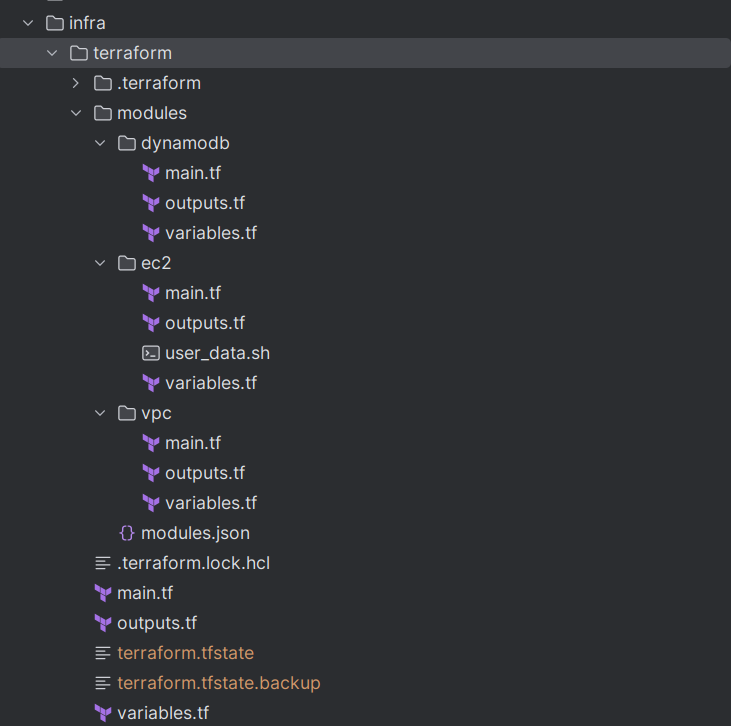
Which corresponds to this AWS infrastructure:
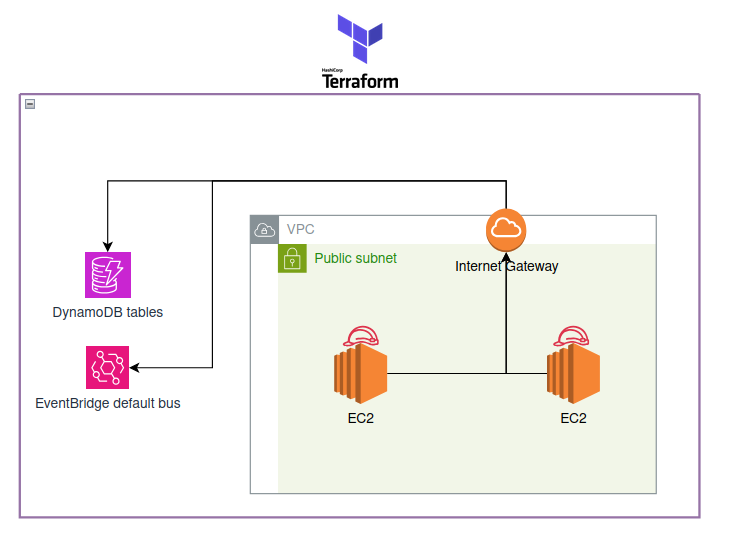
I have not put the data stream in terraform, but it could be done easily like this:
resource "aws_kinesis_stream" "test_stream" {
  name             = "terraform-kinesis-test"
  shard_count      = 8
  retention_period = 24

  shard_level_metrics = [
    "IncomingBytes",
    "OutgoingBytes",
  ]

  stream_mode_details {
    stream_mode = "PROVISIONED"
  }

  tags = {
    project = "portfolio"
  }
}
Also, one caveat is that in order to simplify the directory structure, the IAM permissions for the EC2 instance (that will form the instance profile) are in the EC2 module. The red work helmets in the image above each EC2 are exactly those instance profiles.